Show Shopify stock by location.
Show real-time stock by store, guide shoppers to nearby locations, and enable local pickup, right on your Shopify product pages. No theme code.
Shopify tracks stock per location. Your shoppers can't see it.
Failed pickups
Customers pick a store with zero stock and find out too late.
One "In stock" label
It hides that only one branch has units left.
Busy support teams
"Do you have this at Downtown?" answered all day.
Missed store visits
Shoppers can't see the nearest branch that has the item.
Shopify Locations handles per-location quantities, fulfillment and pickup in admin, but has no per-location stock widget on product pages. MultiLoca adds that storefront layer through an app embed and app block.
Everything shoppers need to buy local.
Live stock for every store, on every product page
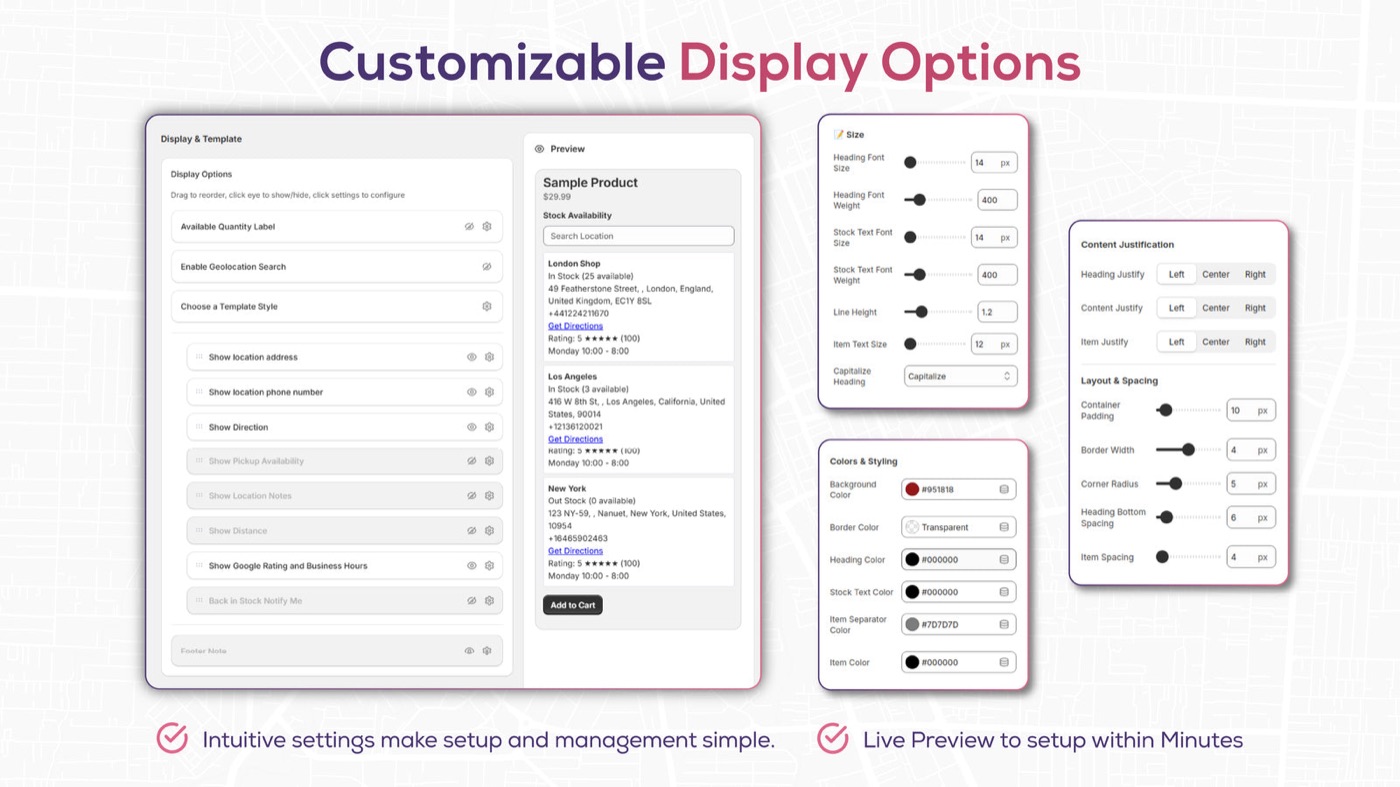
Show in stock, low stock, out of stock and incoming quantities per location, with address, phone, notes and pickup info.
- 14 widget layouts: list, columns, grid, drawer, popup, pickup view and more
- Hide or sort locations, including out-of-stock ones
- Custom labels, colors and CSS with a live preview
Shoppers pick a store, or geolocation finds it
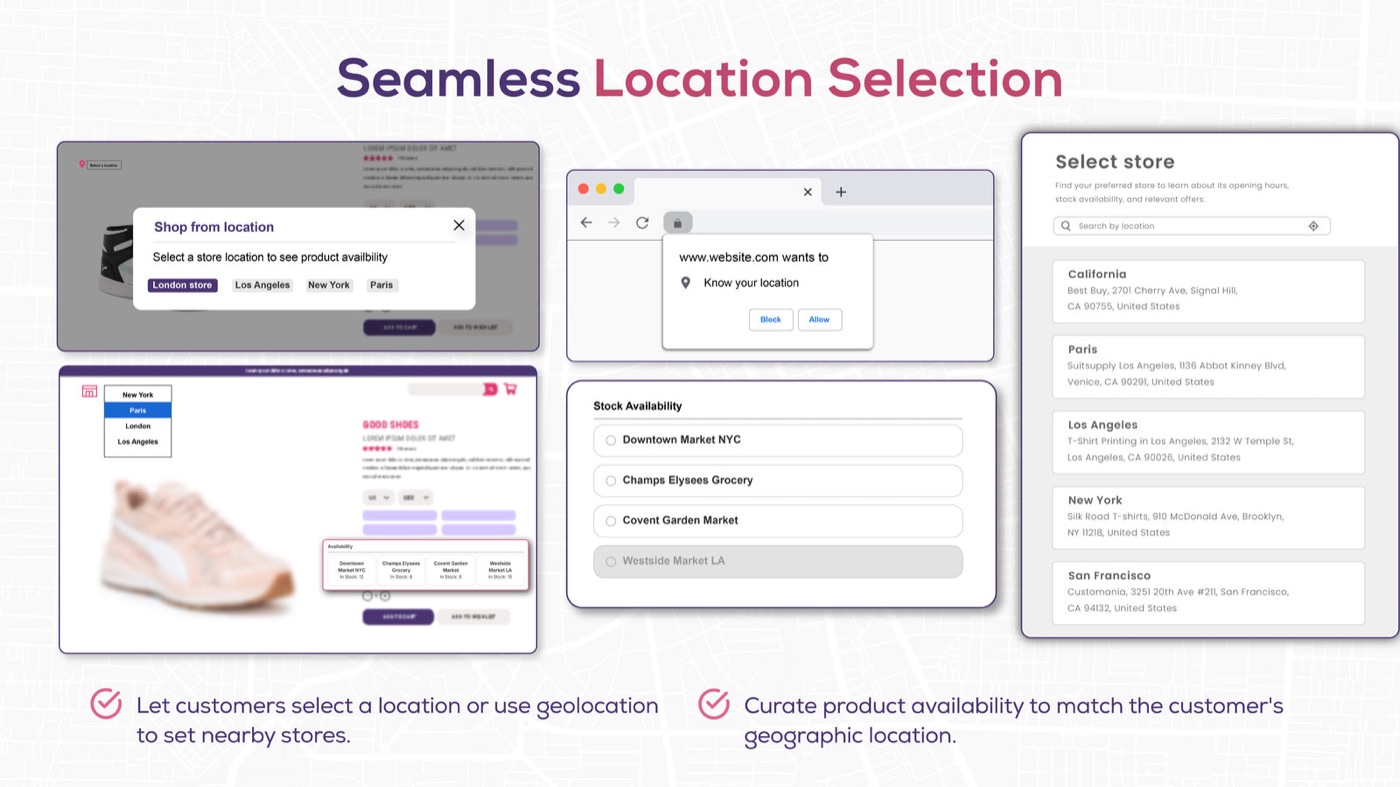
Let customers choose a location in the header or on the product page, or detect their position and show the nearest store with stock.
- Header picker as dropdown, popup or drawer
- Detect location by browser, IP, Shopify Market or typed address/ZIP
- Distance and direction to each store
A store locator with live inventory
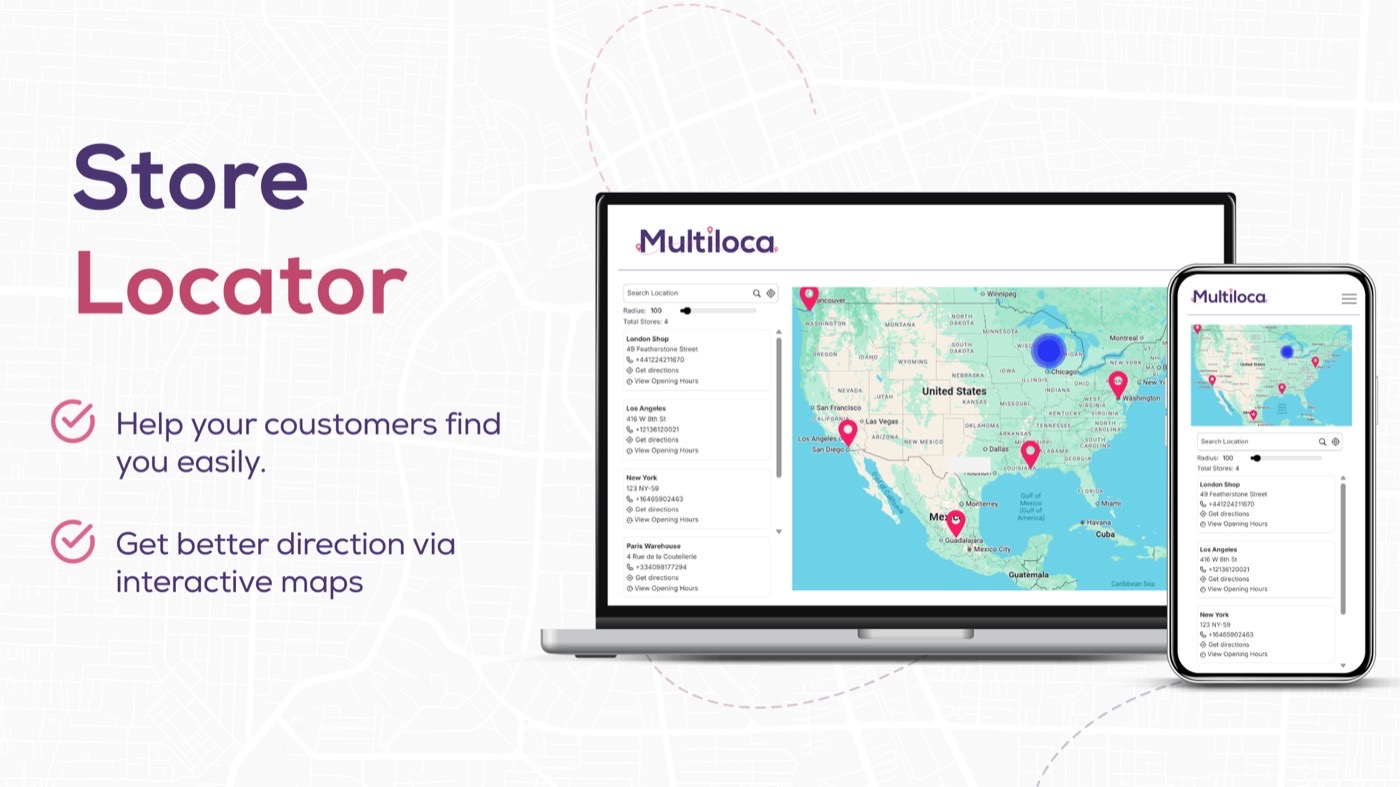
An interactive map of every location, on Google Maps or OpenStreetMap, with radius search, directions, hours and contact details. Add live Google ratings and business hours per location.
- Radius filter and auto-locate the visitor
- Google ratings and hours per location
- Fully responsive on mobile
Browse and filter by location
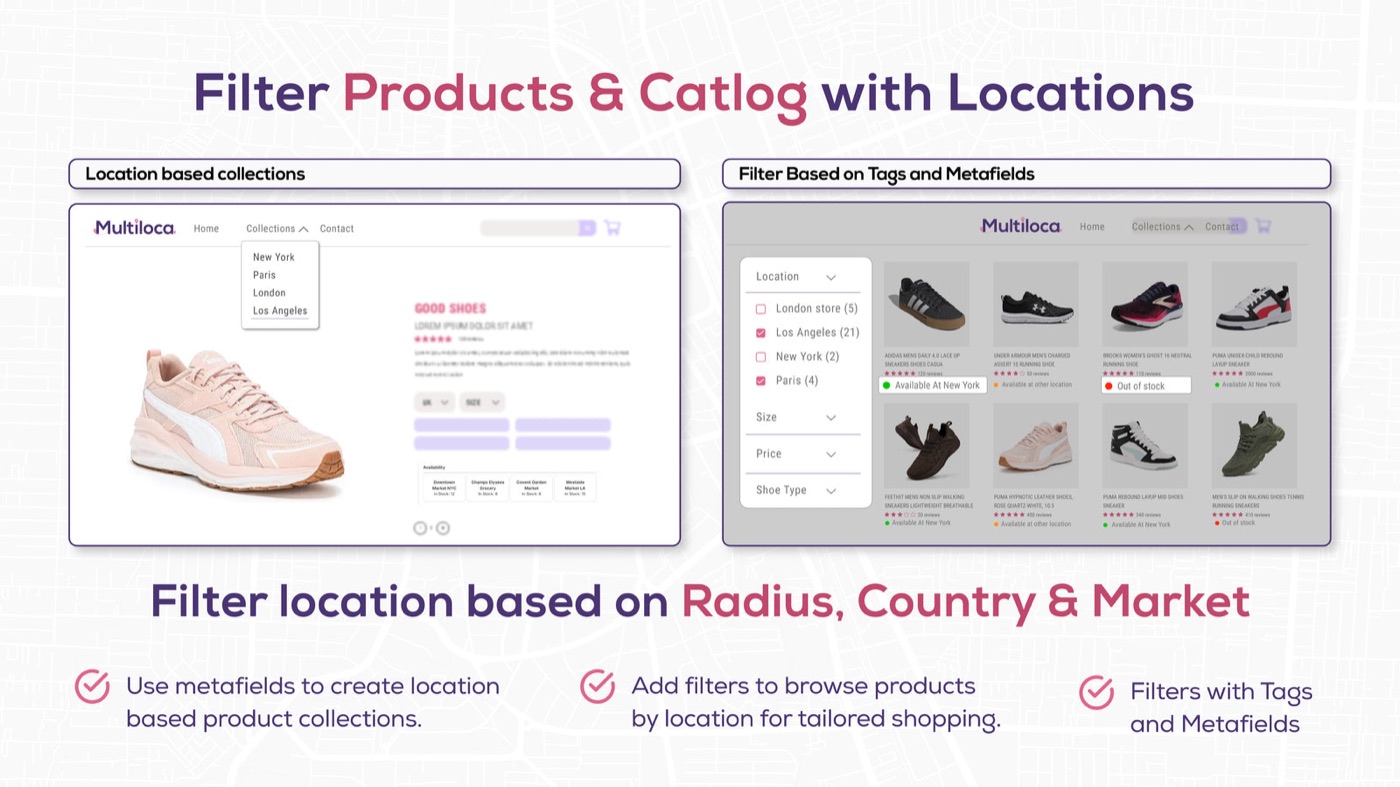
Sync locations to product tags and JSON metafields, then build collections like "In stock in Chicago" and storefront filters with no manual tagging.
- Auto-tag products with location names
- Create a collection for any location
- Filter by radius, country or Shopify Market
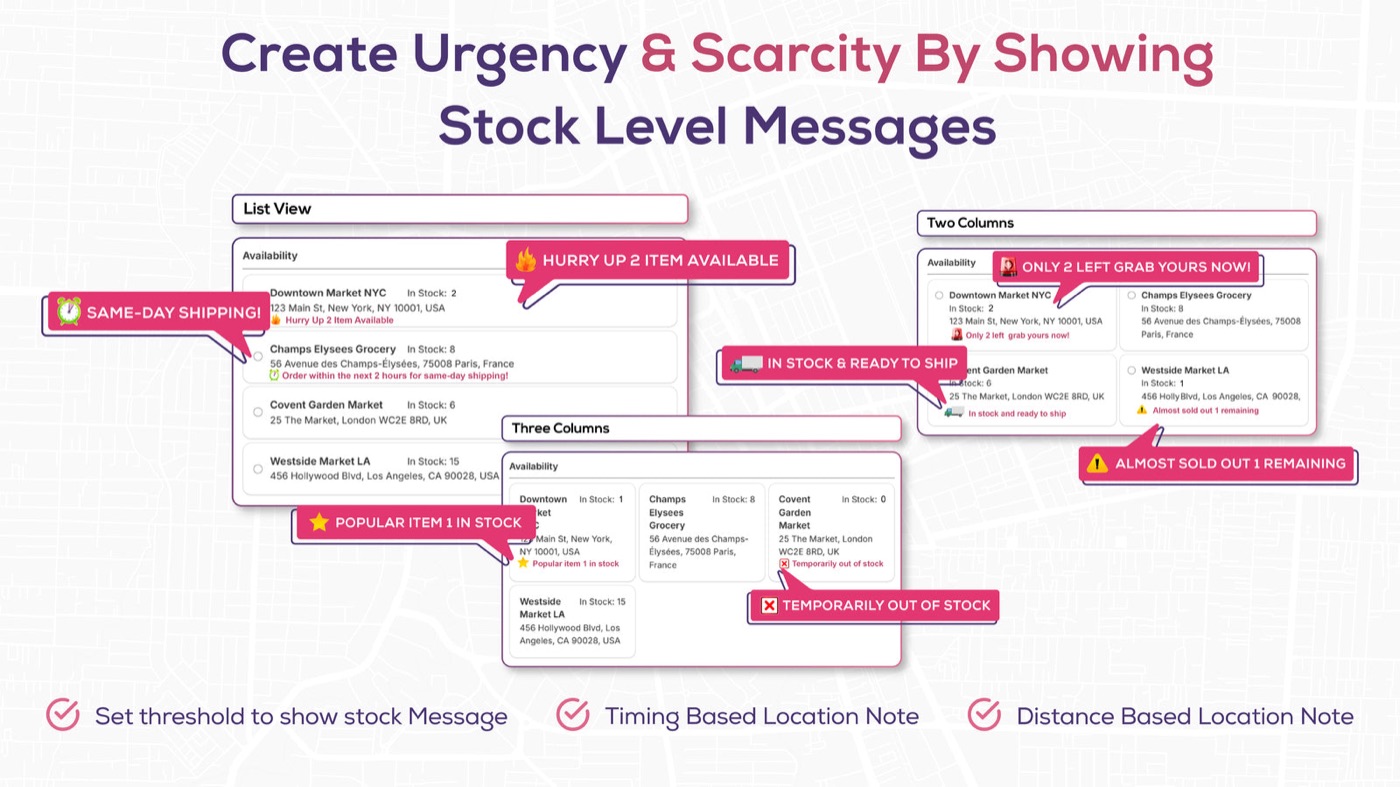
Stock messages that sell
Set stock thresholds for messages like "Only 2 left" or "Almost sold out", and add location notes such as same-day pickup.
From storefront to fulfillment.
Fulfill from the selected store
Orders route to the location the shopper chose. Quantities are capped to that store's stock to prevent overselling.
Bundle inventory
Show how many complete bundles each location can build from its component stock.
Conditional rules
Hide locations, show notes or pick the fulfilling store by customer, cart, product, market or time.
Back-in-stock alerts
Shoppers subscribe per location and get web push, email or SMS when it's back.
Collection-page stock
Show location stock on collection pages and push sold-out products down.
Dashboard analytics
Widget impressions, expand views, tagged products and orders processed via fulfillment rules.
Live in minutes. No coding.
Install & sync
Install from the Shopify App Store and sync your Shopify Locations in the app dashboard.
Add to your theme
Enable the app embed and add the MultiLoca block to your product template. Works with Online Store 2.0.
Make it yours
Pick a layout, set labels, hide/sort rules and pickup text, then preview on desktop and mobile.
Start small. Grow into it.
- Unlimited products
- Location stock on product pages
- 14 widget layouts
- Address, phone, notes, pickup info
- Stock threshold messages
- Hide or sort locations
- Header location picker
- Analytics dashboard
- Everything in Basic
- Distance & directions
- Geolocation search
- Store & stock locator map
- Location tags & metafields
- Collections per location
- Filter collections by store
- Everything in Plus
- Order routing to the selected store
- Location selection popup
- Google ratings & business hours
- Map view on product page
- Bundle inventory
- Checkout address prefill
- Everything in Pro
- Conditional rules for locations, notes & widget
- Filter by radius, country or market
- Show only the selected location
- Location stock on collection pages
- Back-in-stock alerts (push, email, SMS)
- Push down sold-out products
All plans include a 7-day free trial. Prices in USD, billed through Shopify.
Rated 5.0 by Shopify merchants.
"As a multi-location brand, we were really struggling to create an easy shopping experience that allowed customers to shop inventory by store location with ease. Multi Location Stock Info has completely changed that for us. Top notch app and top notch team!"Armstrong Garden Centers · United States
"Now, on every product page, it clearly shows which item is available at which location. My customers love the transparency. The support is the best I have ever seen on the Shopify App Store."Performance Clutches · United Kingdom
"I have multiple warehouses and needed a way to display separate inventory quantities for each location. This plugin does exactly what I was looking for. The customer service is also great. Highly recommend!"Cobetter · United States
"Absolutely fantastic app and even better support. Our business has a fairly complicated multi-location setup. They've figured out what I need and worked with me to make it function properly for our store."Divine Beauty Supplies · Canada
"It shows stock availability across online and retail locations, which makes it easier for customers to place orders based on the nearest store. The support team is excellent and very responsive."Wedtree · India
"I tried out a few different inventory/location apps and Multi Location Stock Info app is by far the best app and the best price. Their tech support is top notch. 5 stars, 10/10 great app!"Christmas Light Contractors USA · United States
Shopify questions.
Can Shopify show stock by location on the product page by itself?
Shopify manages inventory by location in admin, but it has no built-in per-location stock widget on product pages. MultiLoca adds store-level availability to your storefront.
Do I need to edit my theme code?
No. For Online Store 2.0 themes you enable the app embed and add the app block. For custom themes, our support team can help.
Will inventory stay in sync with Shopify?
Yes. MultiLoca reads your Shopify location inventory, so keep admin and POS quantities accurate for a reliable storefront display.
Does it support warehouses and retail stores together?
Yes. Any active Shopify Location you choose can appear in the widget, with hide, sort and rules options depending on your plan.
Can I create collections like "In stock in Chicago"?
Yes. On Plus and above, location tags and metafields let you build a collection per location and filter collections by the selected store.
Does it work with Shopify Markets?
Yes. Premium can filter locations by country or market.
What languages are supported?
The app admin is in English, Spanish, French and German, the storefront widget ships in 10 languages, and every label is customizable.
How much does it cost?
Plans start at $4.99/month with a 7-day free trial on every plan.
Turn every store into a reason to buy.
Install MultiLoca on Shopify and show shoppers where your stock is today. 7-day free trial, no coding.