One store. Every location.
One WooCommerce store, with every warehouse, shop and pickup point holding its own stock, price and rules. Detect the nearest location, show live availability, and fulfil from the right shelf.
WooCommerce has one stock number. You have many shelves.
Out of the box, WooCommerce stores a single global stock quantity per product. Stores with several locations end up on spreadsheets and manual adjustments, which means human error, overselling and inconsistent stock.
Shoppers expect instant answers. If they can't see whether a product is available at their store, they hesitate, and hesitation turns into abandoned carts.
- Separate stock for every product at every location
- Real-time updates after orders, refunds and cancellations
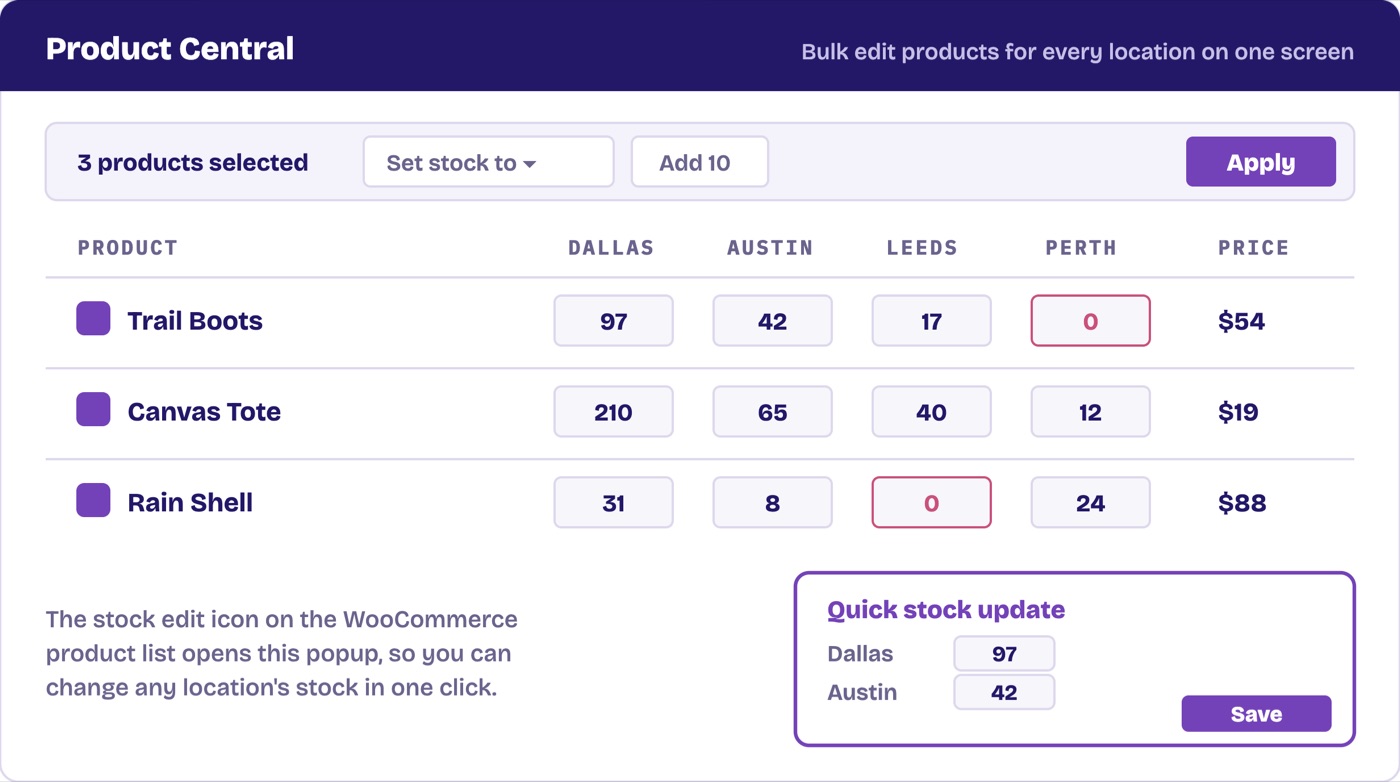
- Each location's stock rolls up into your WooCommerce stock
Built for stores that ship from more than one place.
Product Central: every location on one screen
Bulk edit stock and prices for every location at once, or click the stock icon on the WooCommerce product list to update any location in a popup.
- Unlimited locations and location groups
- Simple and variable products, stock per variation per location
- Per-location In stock / Out of stock / Backorder
- CSV import and export of location stock
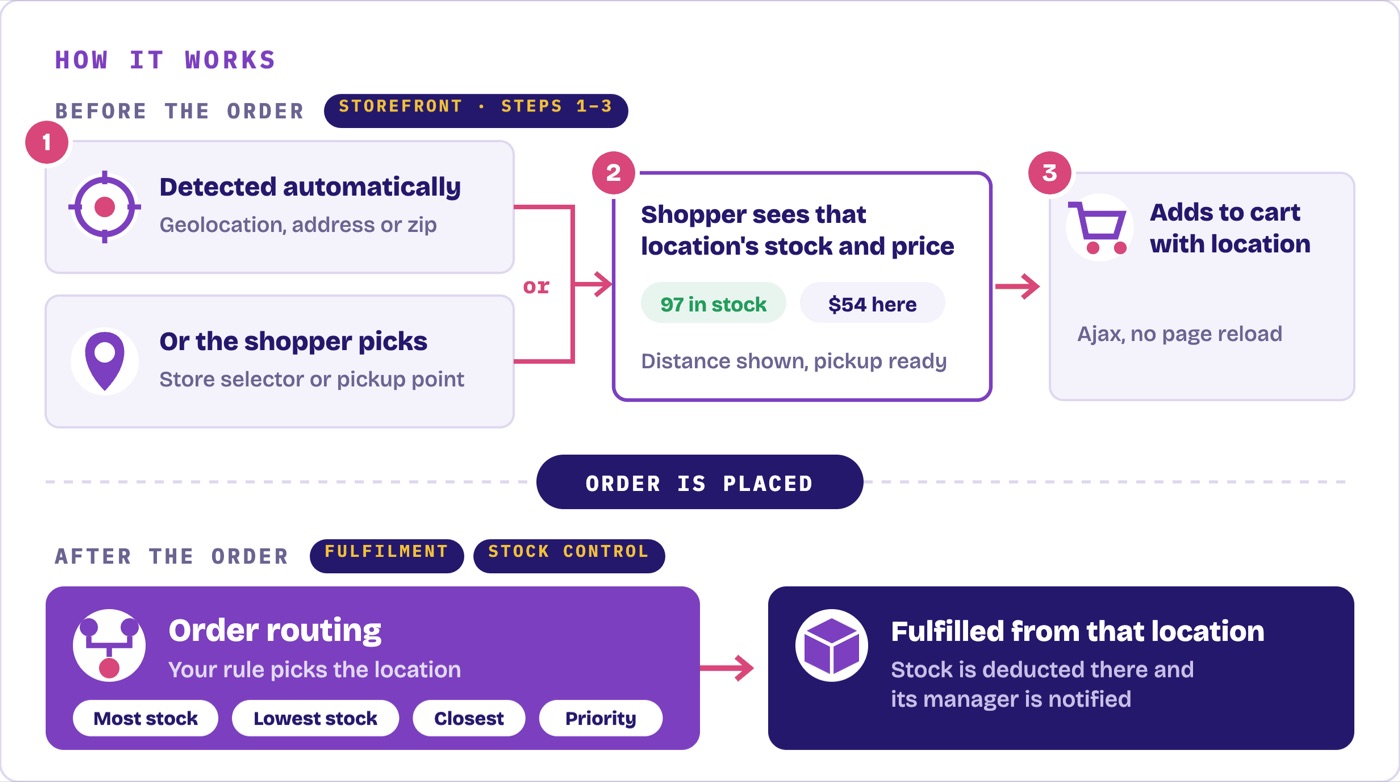
Shoppers see their store's stock, price and distance
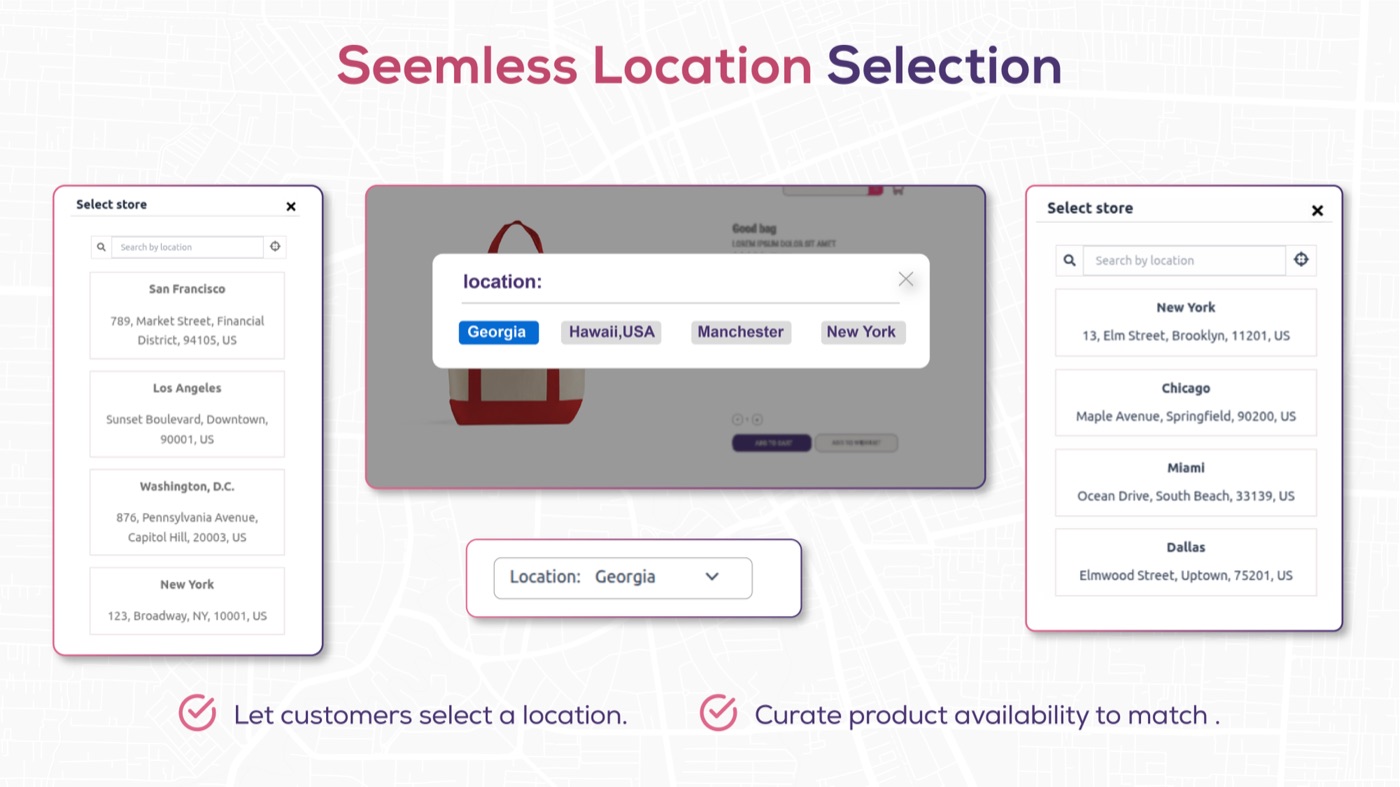
Visitors pick a location, or MultiLoca detects the nearest one from their address or IP, using Google Maps, MaxMind, IPinfo, Cloudflare or browser geolocation. The choice is remembered when they return.
- 10 display views: table, list, cards, select, drawer, popup and more
- Store locator on Google Maps, filtered by product or radius
- Out of stock here? Suggest the nearest location that has it
- Ajax add-to-cart with the location, no page reloads
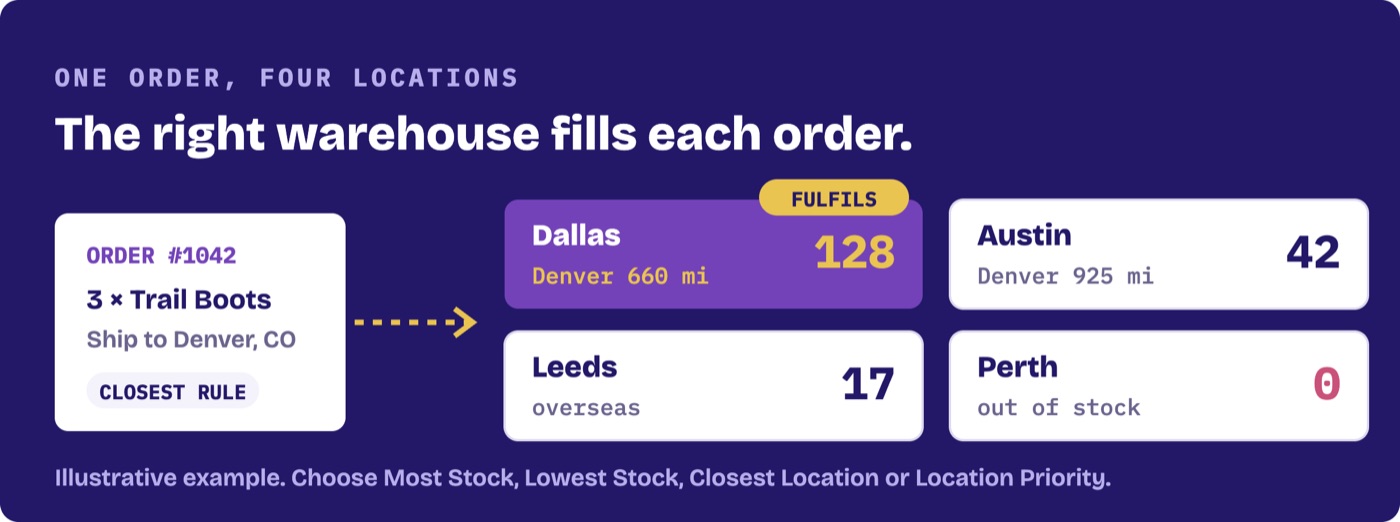
The right warehouse fills each order
Let shoppers pick their location, or run backend-only mode and route orders automatically: by most stock, closest location to the shipping address, location priority or shipping zone. Customers see a normal checkout.
- Every line item tagged with its fulfilment location
- Admin order filter by location
- Location managers notified by email
Shipping and pickup from every location
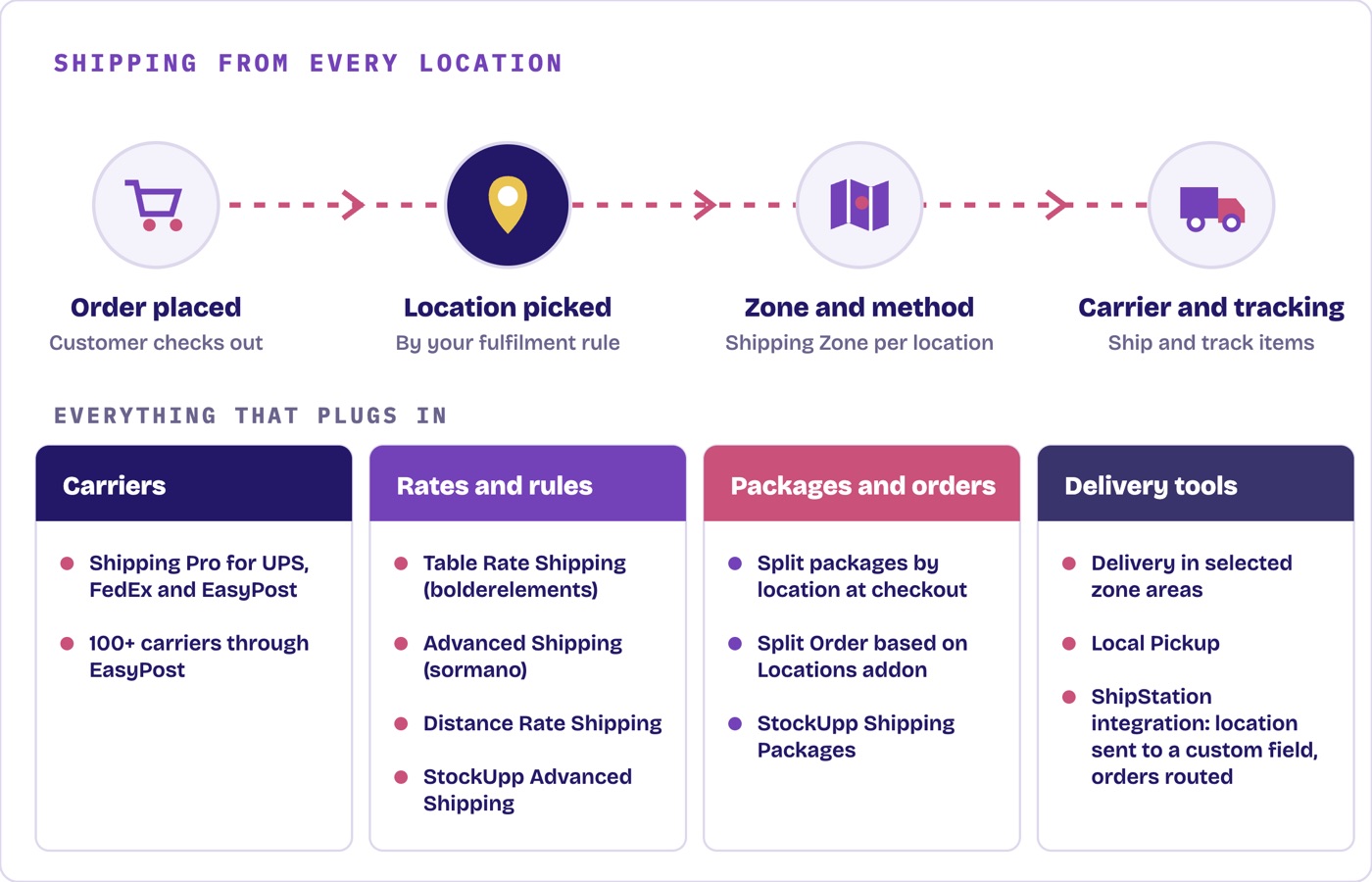
Assign shipping zones and methods to each location, split cart packages by location, offer local pickup, set a delivery radius, and send the location to ShipStation.
- Location-aware shipping zones and methods
- "Pickup Location" shipping method per store
- Works with Table Rate Shipping and WooCommerce Advanced Shipping
Price, pay and tax like a local.
Location-wise pricing
Different regular and sale prices per location for local market strategies.
Payment methods per location
Assign gateways per location for separate payouts, like cash on delivery only at physical stores.
Taxes, fees & coupons
Tax per location, an optional location fee, and coupons that only work at chosen locations.
Location managers
Location Shop Manager and Regional Manager roles, each limited to their own stores.
Local SEO pages
A page per location with schema markup, plus Google Local Inventory feeds via CTX Feed.
REST API & hooks
Read and update stock at every location. HPOS compatible and translation ready.
Stores and online share one stock
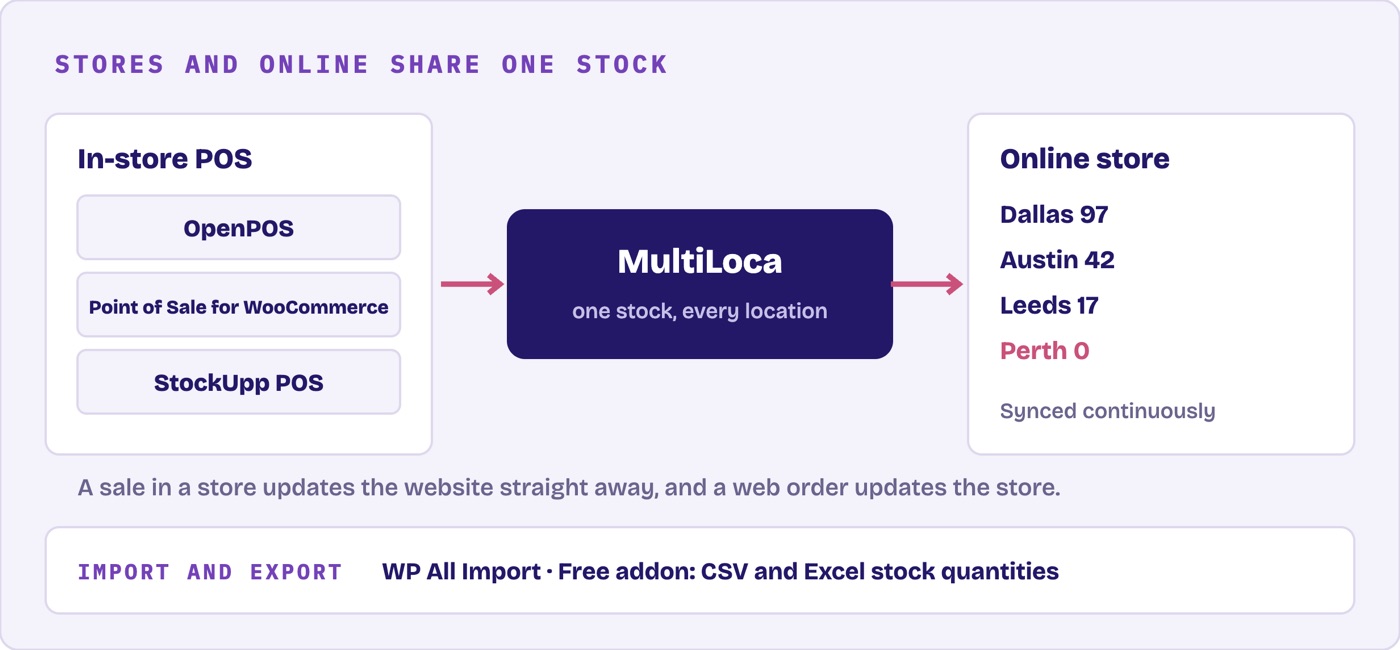
A sale in a store updates the website straight away, and a web order updates the store. MultiLoca syncs with OpenPOS, Point of Sale for WooCommerce and StockUpp POS, or use MultiLoca POS: multiple outlets and cashiers, discounts, held orders, refunds and sales analytics.
Start free. Upgrade when you grow.
- Unlimited locations
- Stock per location, incl. variations
- Location stock on product pages
- Shoppers pick a location before add to cart
- 5 location block views
- Shop filter widget
- Custom texts & CSS
- Everything in Lite
- Location selection & groups
- 10 block views with live preview
- Automatic location detection
- Store locator on Google Maps
- Product Central bulk editing
- Location thresholds & notes
- Location Shop & Regional Managers
- Local pickup locations
- Backend-only fulfilment mode
- Everything in Pro
- MaxMind location detection
- WooCommerce POS support
- Conditional rules for the location block
- Location filter widget
- Filter locations by radius
- Stock transfer between locations
- Smart Allocation & Local Pickup rules
All plans are for 1 website. Prefer a one-time licence? Buy MultiLoca on CodeCanyon ($99 regular licence, 6 months support included).
What store owners and developers say.
"If you're looking for multi-branch stock location ability look no further. This plugin does exactly what I wanted, full REST API support too which for me was essential."neildurant · CodeCanyonFeature availability
"I have tested several alternatives and this is by far the best solution to date. Highly recommend. But, most importantly, what a professional and responsive support service!"razoom01 · CodeCanyonCustomer support
"The integration with WP All Import is also the best suitable option for a site with close to 10 000 products. The team is extremely helpful, knowledgeable, and patient."webdexterity · CodeCanyonCustomer support
"Great plugin and great support. Also, as a programmer, I analyzed the code and it's clean and understandable."pukkeros · CodeCanyonCode quality
"We even developed a new custom functionality, they did it in a couple of days, now it's a part of the product. Very very satisfied."geopapai · CodeCanyonCustomer support
"The plugin is very extensive and flexible with the customer's needs. The best multi-location plugin I have found so far."andrewque001 · CodeCanyonCustomer support
Fits the stack you already run.
Blocks & shortcodes
6 Gutenberg blocks and 10 shortcodes that drop into any page builder
Themes
Any well-coded theme, with dedicated fixes for Flatsome, Avada, Woodmart and XStore
POS
OpenPOS, WooCommerce Point of Sale, StockUpp POS and POS Ninja
Plugins
WPML, CURCY multi-currency, CTX Feed, Table Rate Shipping, Advanced Shipping, HPOS
WooCommerce questions.
Does WooCommerce support multi-location inventory by default?
No. WooCommerce stores one stock value per product. MultiLoca adds separate stock, rules and fulfilment for every location.
How does MultiLoca prevent overselling?
Stock is tracked and validated per location, at cart and again at checkout, so shoppers can only buy what the selected location has. Cancelled orders (and optionally refunds) restore stock to the original location.
Can I manage unlimited warehouses or stores?
Yes, at no extra cost. Each location has its own stock levels, priorities and visibility settings.
How does order routing work?
Orders go to the location the shopper selected, or in backend-only mode to the location with the most stock, the closest one, the highest priority, or by shipping zone.
Does it work with variable products?
Yes. Location stock works for simple and variable products, including stock per variation per location.
Does it work with POS systems?
Yes. It syncs per-location stock with OpenPOS, WooCommerce Point of Sale, StockUpp POS and POS Ninja.
Is it HPOS compatible?
Yes. MultiLoca declares compatibility with WooCommerce High-Performance Order Storage.
Do I need coding knowledge?
No. Everything is point-and-click from the WooCommerce dashboard. Developers get a REST API, hooks and filters.
Manage smarter. Sell faster. Scale with MultiLoca.
Start with the free Lite plugin, or try Pro and Premium on a 24-hour demo site.